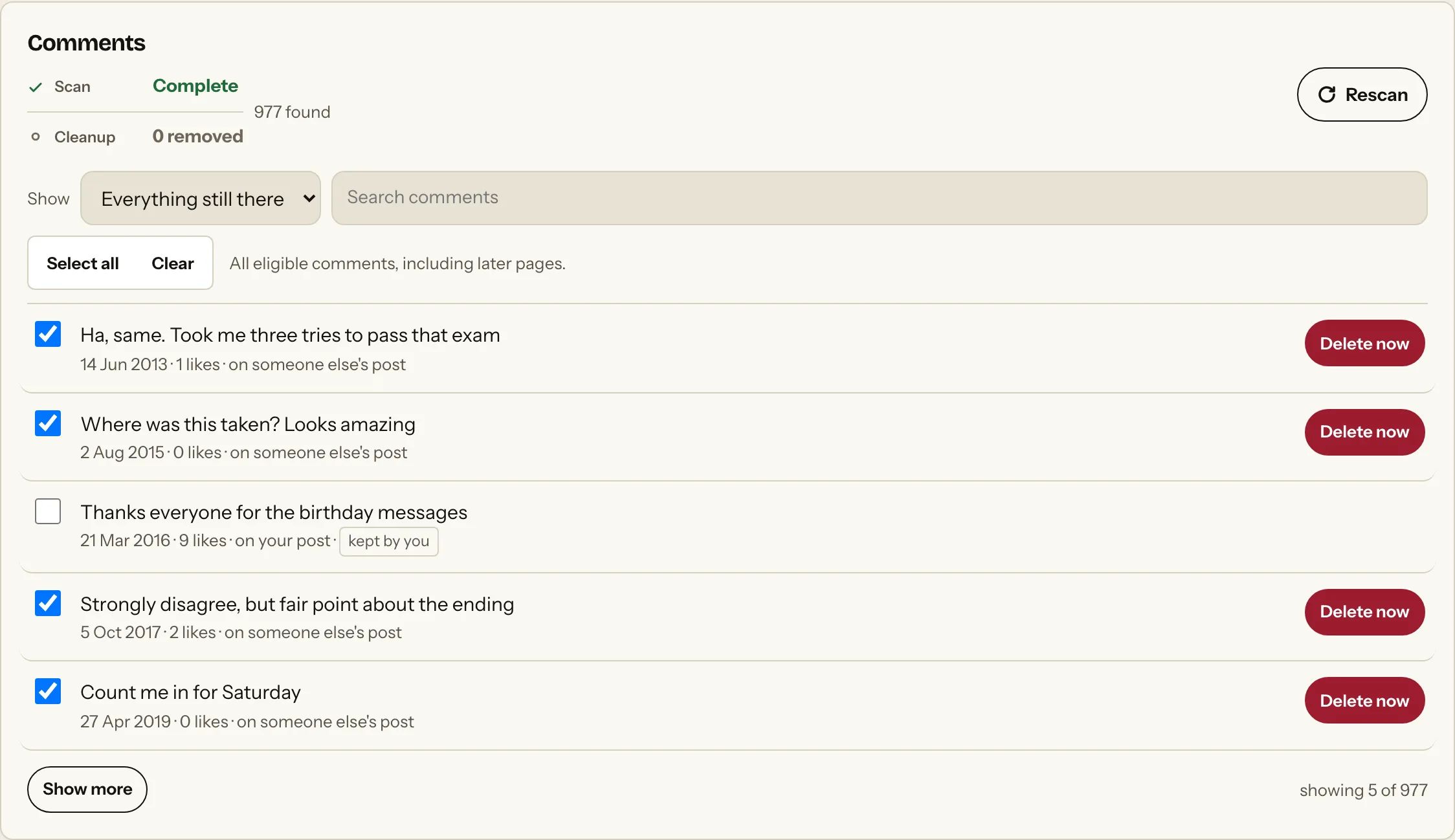
Delete all Twitter replies
Delete all Twitter replies without touching your posts. The extension reads the Replies timeline as its own list so the two never get mixed up.
- Source design
- Signed-in Replies timeline
- Removal design
- X native Delete control
- Date support
- Reply date
- Availability
- Current live flow unverified
Short answer
Replies are the largest part of most X accounts and the hardest to review, because they sit under other people’s posts rather than on your own timeline. X has no control that clears them as a group. The extension reads the Replies timeline as its own category, so replies are never acted on as original posts, and each is removed through X’s native Delete control. Classification depends on the timeline X currently renders and can be incomplete.
Limit
Classification depends on X’s current rendered timeline and can be incomplete. Current live deletion has not yet been verified.
Why native cleanup is hard
The platform controls work. They were never built for history, which is the friction people hit before they look for anything else.
- They outnumber postsMost accounts reply far more often than they post, so volume is the main obstacle.
- Buried in other threadsA reply lives inside someone else’s conversation, so no single view gathers them.
- No category filterThe native profile view does not separate replies from posts for removal.
- The context is goneA reply read without the post it answered is easy to misjudge years later.
What actually changes
The platform controls still do the deleting. The extension changes how you get to them.
| Task | On the platform itself | With the extension |
|---|---|---|
| Find them at all | Buried under other people’s threads | Read from the Replies timeline as one list |
| Keep them apart from posts | The profile view mixes them | Separate categories, deliberately, throughout |
| Remove more than one | One reply per interaction | A reviewed batch, ticked before anything runs |
| Filter by date | No date filter on the timeline | Filter by reply date across the found list |
| Confirm it went | No confirmation offered | Only after a fresh complete reread finds it gone |
| Asks for your password | Not applicable, it is X | Never. It uses the tab you already signed into |
What this page covers
Every way people ask for this.
How to delete Twitter replies
Replies sit under other people’s posts rather than on your own timeline, which is why they are the hardest part of an account to review. The extension reads the Replies timeline as its own list.
Delete all replies on Twitter
Most accounts reply far more often than they post, so volume is the real obstacle. There is no native control that clears them as a group.
Delete replies but keep your posts
Keeping the two categories apart is the point. Your original posts are never acted on as replies, and the reverse is equally true.
Delete old Twitter replies
X exposes a reply date, so you can narrow to a period and clear the oldest arguments first.
Why old replies read badly
A reply without the post it answered has no context, which is exactly how a screenshot years later presents it.
Delete replies without deleting your account
Your handle, followers and posts are untouched. Only the replies you tick change.
Scan, review, then act.
The extension keeps discovery, selection and action as separate decisions.
- 01
Scan the supported source
The implementation reads the current signed-in platform view and labels incomplete results.
- 02
Review every selection
Apply supported date filters and keep any item you do not want to change.
- 03
Attempt the native control
Availability depends on the platform and test status above. Submitted is not confirmed; incomplete verification stays unknown.
Why people do this
The reasons that bring people to this page, rather than a generic case for privacy.
A job search
Replies are where arguments happen, and they carry your name.
Old arguments
Threads from years ago that no longer represent how you engage.
Privacy housekeeping
Reducing the record of who you talk to and how often.
A fresh start
Clearing conversation history while keeping your own posts.
Questions
Specific answers for this activity type.
Why are replies separate?
Separating timelines prevents original posts and replies from being acted on as one category.
Can a reply scan be incomplete?
Yes. The extension labels partial scans rather than presenting the count as a complete total.
Can I delete replies by date?
Yes. X exposes a reply date, and that is the filter the extension uses.
Does deleting my reply delete the thread?
No. It removes only your reply. The post it answered belongs to whoever wrote it.
Can I recover a deleted reply?
No. X deletion is permanent. Export your archive first.
Are quote posts replies?
No. A quote post appears on the Posts timeline and is handled there.
Will X restrict my account?
Unknown, and this is one reason removal remains unverified.
Does it work on the app?
No. Desktop Chrome only.
Do my replies leave my computer?
No. Everything found stays in Chrome storage.
Why do I have so many more replies than posts?
Most accounts do. Conversation outnumbers publishing, which is why this list is usually the longest.
Related X routes
Elsewhere on the extension
Before you remove anything
There is no public build yet, and X removal is still being verified. The free digital footprint checklist covers the review work worth doing first.