Delete Instagram posts in bulk
Delete or archive several Instagram posts at once with Instagram’s own tools, or scan and review them for free in Chrome before optional paid cleanup.
Scan and review for free. Cleanup is optional and paid.
How to delete multiple Instagram posts
Instagram has its own bulk delete. In the app, go to your profile, tap Menu, then Your activity, then Posts. Tap Select, choose the posts and tap Delete. You can sort from newest to oldest or limit the list to a date range first. Your account stays open.
To read through your posts in one list on a computer before choosing, use the extension’s Instagram Posts category. Scanning is free; deletion is paid.
Delete multiple posts with Instagram’s own tools
Save a copy of the posts you want before deleting them. Instagram can take up to 30 days to send an export, and deleted posts are not included in it. Follow the backup checklist.
Open Your activity
In the Instagram app, tap Profile or your profile picture in the bottom right. Tap Menu in the top right, then tap Your activity below How you use Instagram.
Open your posts
Below Content you shared, tap Posts.
Sort or filter
Tap newest to oldest to change the order, or tap All dates to show only posts from a date range.
Select the posts
Tap Select in the top right, then tap each post you want to remove.
Delete and confirm
Tap Delete at the bottom, then tap Delete again to confirm. The posts move to Recently deleted.
On a computer
In a browser, click Menu in the bottom left, then Your Activity. Click Photos and Videos, then Posts, Reels or Highlights. Click Select, choose the posts and use Sort & Filter if you want a date range. Click Delete, then Delete again.
Archive instead of deleting
Archiving hides a post from your profile and keeps its likes and comments. You can show it again whenever you like. To archive several posts, follow the app steps above and tap Archive instead of Delete. Instagram’s help describes archiving in the app only.
If you change your mind
Deleted posts stay in Recently deleted for 30 days. In the app, open Your activity and tap Recently deleted below Removed and archived content to restore a post or delete it straight away. Recently deleted is not available on a computer. Instagram says the full deletion process can take up to 90 days.
Sources: Instagram’s help on deleting posts, archiving posts, restoring deleted posts, what happens to deleted content and exporting your information.
Review your posts on a computer before choosing
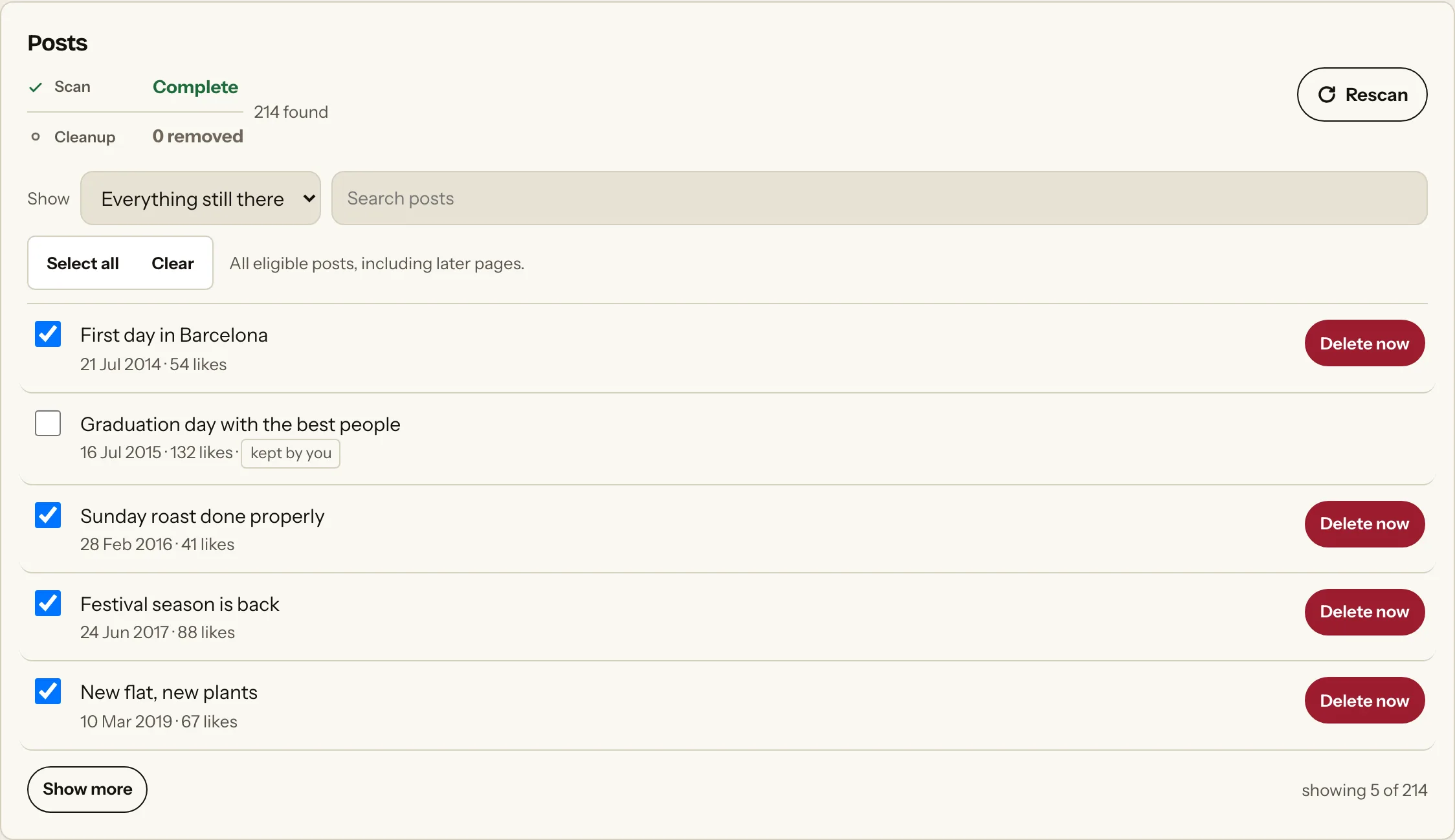
Instagram’s own tools are enough when you already know which posts should go. The extension helps when you want to go through your posts first. It scans your profile grid in Chrome and reads each post’s date from its Instagram link, so a date range works for posts. You keep what you want, then delete or archive the rest. It uses your signed-in Instagram session; you do not give the extension your password.
What this scan includes
A scan covers the posts on your profile grid, including reels and carousels. Stories, highlights and posts you are only tagged in are not part of it. Likes, comments and reposts have their own categories. A pinned post may need unpinning in Instagram before it can be deleted.
How to use the extension for Instagram posts
Connect the right Instagram account
Add the extension to Chrome on a computer. Sign in to Instagram, open the extension’s Instagram screen and choose Connect Instagram. Approve Chrome’s site permission when asked.
Scan Posts for free
Select Posts and start a scan. Keep the Instagram tab in front while it runs. If the scan is incomplete, resume or rescan before treating the list as complete.
Review posts and keep what matters
Read the results before choosing cleanup. Leave the posts you want to keep out of the selection, or set a date range for an older period.
Choose delete or archive
Switch on Archive posts instead of deleting if you would rather hide posts than remove them. Leave it off to delete.
Confirm paid cleanup
Check the selection and the confirmation before starting. Scanning and review are free; cleanup requires a paid plan. You choose whether to continue.
Check what was confirmed
The extension counts a post as done once it has left your profile grid. If a result stays unconfirmed, check the post in Instagram rather than assuming it has gone.
The extension’s Instagram Posts list
Choose a cleanup that fits what you need
Clearing one period
If everything from a certain stretch of time can go, Instagram’s All dates filter is enough. Use a scan when you want to go through the grid and keep particular posts.
Hiding posts you are unsure about
Archive keeps a post’s likes and comments and lets you bring it back later. Delete only what you are sure you want gone.
A profile review before applying for jobs
Check what your public profile shows first. Review older posts in context, then decide what to keep, archive or delete. No cleanup can guarantee what an employer will see or decide.
Questions about deleting Instagram posts
Can I delete multiple Instagram posts at once?
Yes. In the Instagram app, open Your activity, then Posts, select several posts and delete them together. The extension can also work through a selection from Chrome on a computer after a free scan and review; that cleanup is paid.
Can I delete Instagram posts by date?
Yes. In the app, tap All dates on the Posts screen in Your activity to choose a date range. The extension reads each post’s date from its Instagram link, so you can set a date range there too. A post without a readable date is left out of dated cleanup.
Should I archive or delete?
Archive if you might want a post back: it leaves your profile but keeps its likes and comments. Delete if you want it gone. Deleted posts stay in Recently deleted for 30 days before Instagram removes them.
Can I keep specific posts?
Yes. In Instagram, select only the posts you want to remove. In the extension, leave the posts you want to keep out of the cleanup selection.
Can I recover a deleted Instagram post?
Within 30 days, yes. Open Recently deleted in the Instagram app and restore it; it is not available on a computer. After 30 days the post cannot be restored, and the extension cannot restore posts.
Does deleting posts delete my Instagram account?
No. Deleting posts leaves your account, followers and other activity in place.
Can I use the extension on my phone?
No. It runs in Chrome on a computer. On a phone, use Instagram’s own steps on this page.
Does the extension cost anything?
Scanning and reviewing are free. Deleting or archiving through the extension requires a paid plan. You can review the scan without choosing paid cleanup.
See which posts you want to keep
Scan and review your Instagram posts for free. Choose whether to continue with paid cleanup after you have seen the results.