Delete all Facebook posts
Delete old Facebook posts without deleting your account. Follow Facebook’s own tools or scan and review for free before optional paid cleanup.
Scan and review for free. Cleanup is optional and paid.
How to delete old Facebook posts
To delete old Facebook posts, open Activity Log, find your posts, select the ones you want to remove and use the removal control Facebook offers. Facebook also supports bulk management through Manage Activity. You can keep your account while removing posts.
For a separate scan and review before cleanup, use the extension’s Facebook Statuses category. Scanning is free; deletion is paid.
Delete multiple posts with Facebook’s own tools
Save a copy of posts and photographs you want before removing the originals. Follow the backup checklist.
Open Activity Log
Sign in to the Facebook profile you want to clean up. Open Activity Log from your profile menu or Settings & privacy.
Find your posts
Open the posts category or Manage Activity, where available. Use the available date and category filters to find an older period. Menu names and available actions differ between devices and content types.
Review your selection
Select the posts you want to remove. Check what is selected before using Trash or Delete. Work through the available batches rather than assuming one selection includes your whole history.
Read the confirmation
If Facebook offers Archive, that keeps the post privately. Trash keeps eligible posts for 30 days unless you delete or restore them sooner. Follow the confirmation shown for your selection.
Why an older history still takes review
Facebook already offers tools for managing multiple posts. The work is finding the right period, checking what each selection includes and keeping the posts you still want. A date filter narrows the list; it does not prove that every old post is included.
Sources: Facebook’s Activity Log help and Meta’s explanation of Manage Activity.
Review the posts found before choosing cleanup
The extension brings the supported posts and statuses it finds into a review in Chrome. Choose Facebook and the Statuses category, scan for free, then decide what to keep before optional paid cleanup. You use your signed-in Facebook session; you do not give the extension your Facebook password.
What this scan includes
A scan covers the activity Facebook makes available in the supported view. It is not a complete account archive. Photos, videos and comments have separate categories. Someone else’s post, a screenshot or a copy outside your account needs separate attention.
How to use the extension for Facebook posts
Connect the right Facebook account
Add the extension to Chrome on a computer. Sign in to Facebook, open the extension’s Facebook screen and choose Connect Facebook. Approve Chrome’s site permission when asked.
Scan Statuses for free
Select Statuses for this posts workflow and start a scan. Check whether it completes. If the scan is incomplete, review the explanation and resume or rescan before treating it as your full available list.
Review posts and keep what matters
Read the results before choosing removal. Leave the posts you want to keep out of the cleanup selection. Where reliable dates are available, use a date range for an older period.
Confirm paid cleanup
Check the selected activity and the confirmation before starting. Scanning and review are free; removing activity requires a paid plan. You choose whether to continue.
Check what was confirmed
Read the cleanup result. A submitted request is not a confirmed removal. If a result remains unconfirmed or the scan cannot finish, check the item in Facebook rather than assuming it has gone.
Your Facebook overview
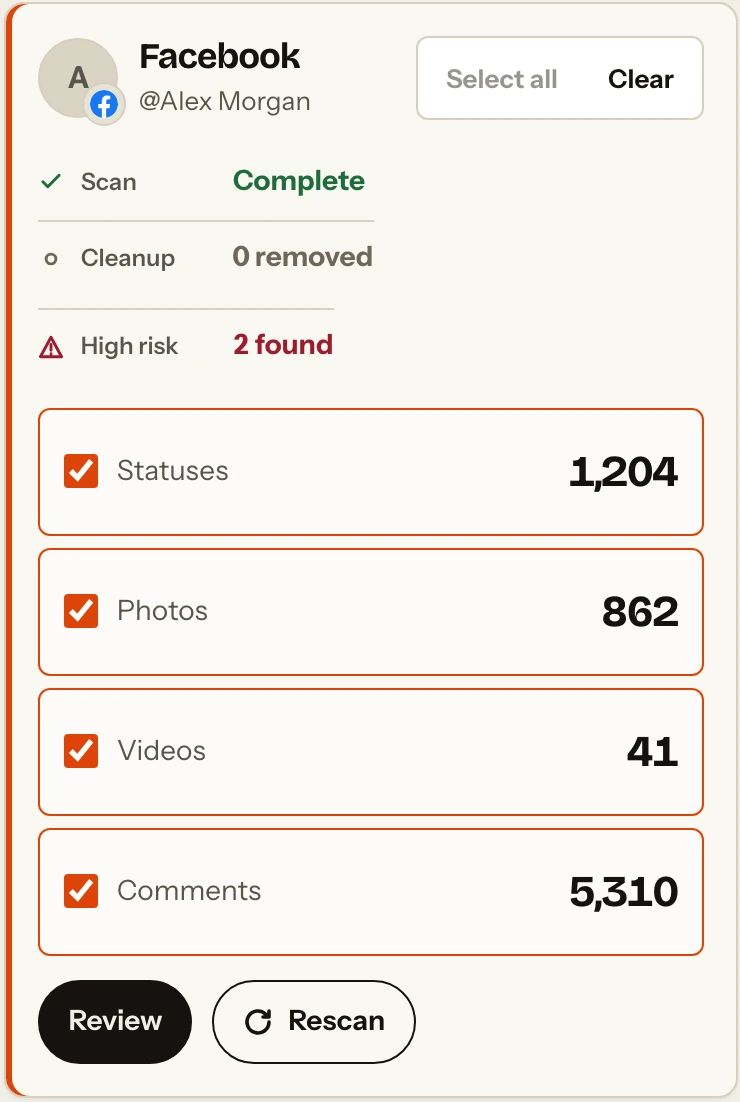
Choose a cleanup that fits what you need
An older period you want to revisit
Start with a scan, then review posts from that period where reliable dates are available. Keep the memories you want instead of treating age alone as a reason to remove something.
A profile review before applying for jobs
Check your public profile first. Review older posts in context, then decide what to keep, restrict or remove. No cleanup can guarantee what an employer will see or decide.
A fresh start with the same account
Back up what matters, then remove selected old posts while keeping the account. Review photos, videos, comments and tagged content separately.
Questions about deleting Facebook posts
Can I delete Facebook posts without deleting my account?
Yes. Removing selected posts leaves your Facebook account in place. Photos, videos, comments and tagged content need their own review.
Can I delete all my Facebook posts in one click?
Do not assume one selection covers your whole history. Review the posts available in Facebook or in a completed extension scan. The extension does not promise to find every post or erase copies elsewhere.
Can I keep specific posts and remove older ones?
Yes. Review what the scan finds and leave posts you want to keep out of the cleanup selection. Date-based cleanup applies where reliable dates are available; check items without a usable date separately.
Does the extension cost anything?
Scanning and reviewing supported activity are free. Removing activity requires a paid plan. You can review the scan without choosing paid cleanup.
Will deleting my post remove other people’s copies?
No. Treat screenshots, copied text and content someone else published as separate copies. Removing your post is not a guarantee that all references or copies disappear.
How do I know a removal worked?
Check the result shown after cleanup. Confirmed removals are separated from requests that could not be verified. If an item remains unconfirmed, check it in Facebook before treating it as removed.
Can I use the extension on my phone?
Use the Chrome extension on a computer. You can read this guide on a phone and use Facebook’s own controls there; the mobile Facebook app does not run the extension.
See which old posts you want to keep
Scan and review your supported Facebook posts for free. Choose whether to continue with paid cleanup after you have seen the results.